Chapter 05 of 20 · 3 min · 25% through
Writing an article
The editor
The writing surface is Markdown with a toolbar. Not a rich-text editor pretending to be a document, and not a bare text box either.
That choice is about what gets stored. A rich-text editor stores its own internal representation and hopes the exporter is faithful. Markdown stores exactly what you see. The file on disk and the thing in the editor are the same text, which means the editor is a convenience rather than a dependency.
The toolbar covers what long-form technical writing actually needs: two levels of heading, bold and italic, strikethrough, links, blockquotes, bulleted and numbered lists, inline code, fenced code blocks, tables, horizontal rules, and image insertion.
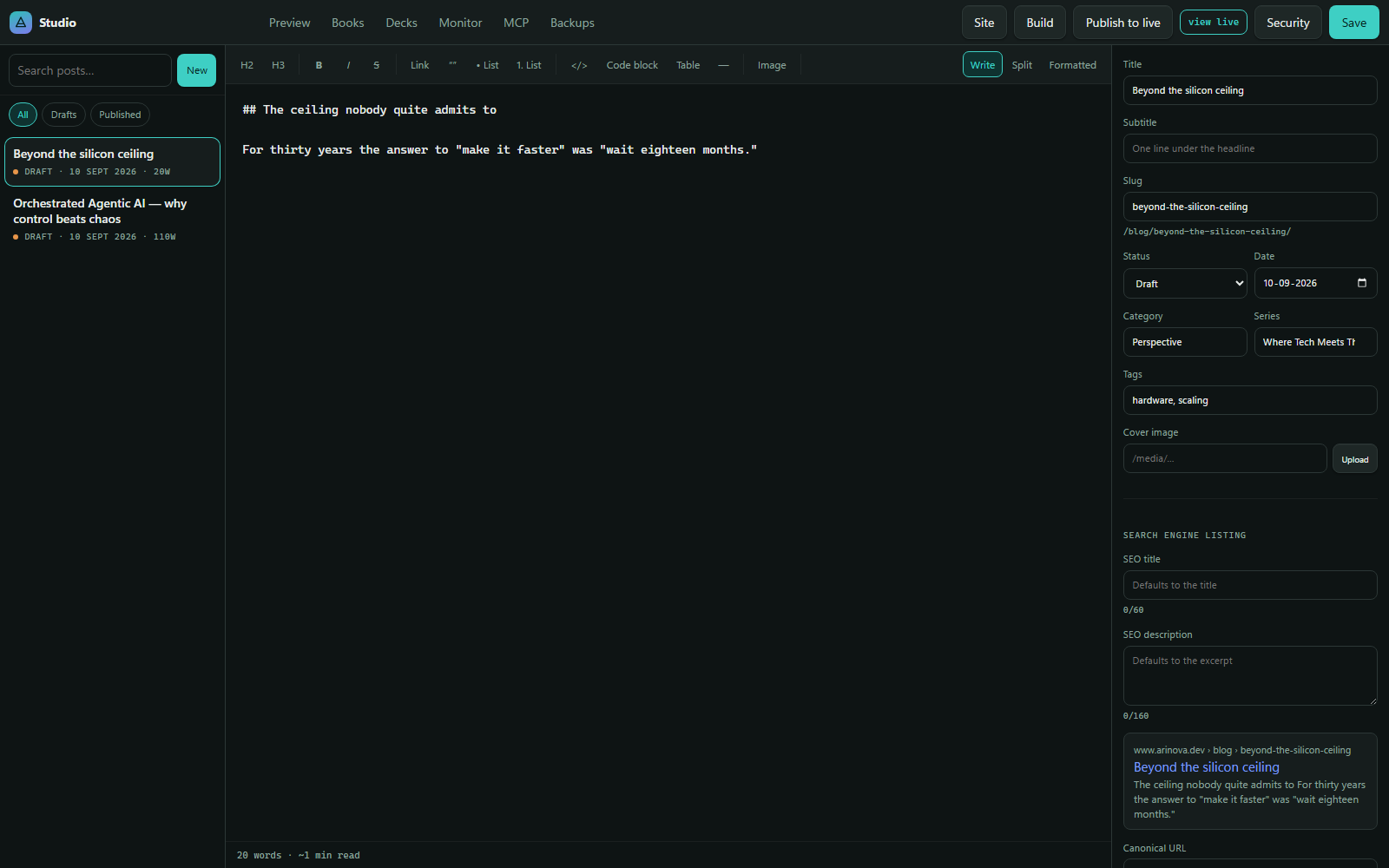
Three view modes sit at the right of the toolbar — Write, Split and Formatted. Write is the raw Markdown. Formatted is the rendered result. Split shows both, scrolling together, which is where I spend most of the time when a piece has a lot of structure in it.
Dropping an image
Images are the one part of writing where a text editor genuinely cannot compete.
Dragging an image file onto the editor uploads it, stores it, and writes the Markdown reference at the cursor. The file lands in the media store, and what goes into the article is a stable URL.
Two details make that better than it sounds. Files are content-addressed — stored under a name derived from the bytes themselves, so dropping the same picture into three articles stores one file and references it three times. And dimensions are measured from the file rather than taken on trust, which matters later for how pages reserve space and how social cards are described.
Typography that gets fixed on the way in
Text written in a browser picks up things that do not belong in a published article: straight quotes where curly ones belong, three dots where an ellipsis belongs, a hyphen standing in for a dash.
Studio normalises those on save. Not as a live-typing autocorrect — that fights you — but once, when the text is written to disk, so the file is clean and the rendered page is typographically correct without anyone thinking about it.
Code blocks are left strictly alone. Smart quotes inside a code sample would be a bug, not a nicety, and the normaliser knows the difference between prose and a fenced block.
Saving, and what it does not do
Saving writes the file. That is all it does.
A new article is created as a draft, always, with no way to skip that. It appears in the list, it renders in the preview, and the live site will not serve it. Going public is a separate, deliberate act — a status change and a publish — and the gap between “saved” and “live” is the most useful property in the whole editing experience. It means I can write badly, save constantly, and never worry about what is visible.
The preview
The Preview tab renders the site exactly as the front end will, against the current content — including drafts, which the live site would refuse.

This is the same rendering path as production, not an approximation of it. If a heading is wrong, a table overflows, or an image fails to load, it fails here in exactly the way it would fail live. There is no separate “preview theme” to drift out of step with the real one.